


Spottrack: Package Tracker
2.025.00 Reviews
App Specs
- Version
- 1.2.5
- Updated On
- License
- Free
- Downloads
- 100,000+
- Developer
- Kidgy
- Categories
- Shopping
- Platform
- Android
Screenshots
 Analysis by AppCompare
I tend to judge a package tracker by a simple test: can it help me make a better decision about my day, rather than just give me another screen to refresh? Spottrack: Package Tracker is designed to bring shipment tracking together in one shopping-focused app. That can be useful when several orders are on the way, but the quality of the experience depends on keeping expectations realistic: a tracker can organize carrier updates, not make a parcel move faster or guarantee an exact arrival time.
A practical routine for keeping deliveries straight
I’d use Spottrack as a single place to check shipments rather than as a replacement for every retailer or carrier account. When an order confirmation arrives, I would save the tracking number and add it to the app, then check the shipment there when I need an update. If the number is available as a barcode, scanning it may save typing; for a number in an email or message, manual entry is the straightforward option.
A small habit makes a multi-order list more useful: add a shipment as soon as the seller provides tracking, and remove it from your mental to-do list only after you have confirmed delivery. If you order similar items from different shops, it also helps to note for yourself which parcel is which when you add it. That way, a carrier status is less likely to become an unhelpful mystery later.
For example, imagine I have a household order and a replacement phone accessory both moving through delivery. I would add each tracking number when it becomes available, check the app before leaving home, and use any fresh status to decide whether I should ask someone to listen for the doorbell or arrange to be back. I would still treat an estimated arrival as a planning clue, not a promise. That distinction is useful: the app can reduce repeated checking, but it cannot remove the uncertainty built into delivery networks.
Settings and expectations worth checking
Notifications are most valuable when they help with a decision. If Spottrack offers shipment alerts on your device, I would keep the ones that matter for receiving a parcel and avoid letting every routine movement interrupt the day. The precise options can vary, so it is sensible to look through the app’s settings and your phone’s notification controls after installation rather than assuming every alert can be tuned in the same way.
I would also check how a shipment is identified before relying on a status. A tracking number can be mistyped, attached to the wrong order, or supplied before a carrier has registered its first scan. When an update seems stale or surprising, compare the number and status with the carrier’s own tracking page. That extra check is not busywork; it helps distinguish an app display issue from a parcel that simply has not received a new scan yet.
Spottrack is free to download, while in-app purchases are listed at prices from $4.99 to $14.99 per item. I would look at what a purchase actually offers before paying, especially if my needs are limited to checking a handful of parcels. The app is rated for Everyone, and Kidgy is its developer. It was released on October 23, 2020, and version 1.2.5 requires Android 8.0 or later.
Worth Reading Before You Choose

EA SPORTS FC Mobile 26 Is a Bigger Football Game, but It Takes Time

Flipboard Shows What News Apps Must Do Beyond the Feed

Switching to Android Auto Means Rethinking Your Driving Routine

Google Calendar Makes a Crowded Week Easier to Manage

Ludo King Makes the Most of the Minutes Between Plans

Baby Panda World Brings Quick Play to Modern Phones, but Its Game Library Feels Busy
Where an all-in-one tracker helps—and where it can’t
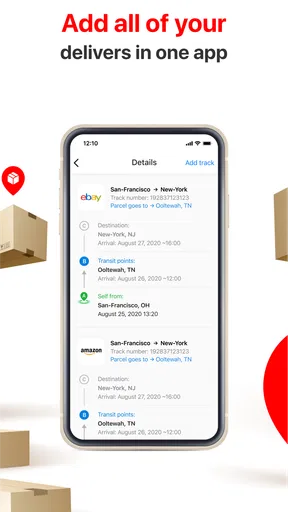
Compared with checking each carrier’s website separately, a multi-shipment tracker can save the small but irritating effort of opening several pages and re-entering numbers. That advantage is strongest for people who shop from multiple retailers or have deliveries overlapping. Carrier apps and retailer order pages may still be better when I need account-specific delivery controls or the carrier’s most direct explanation of a problem; a central tracker is best viewed as a convenient overview, not a universal substitute.
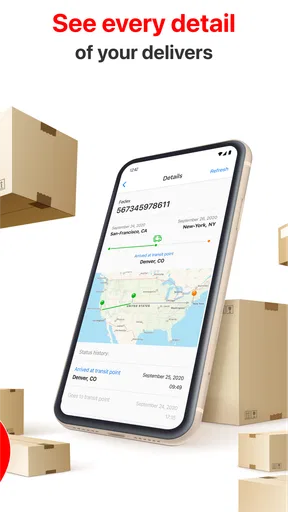
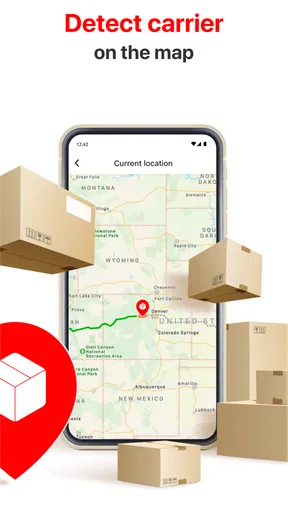
There is also a limit to what a map or a notification can tell me. A visual route may make progress easier to understand, but it should not be mistaken for a live view of a vehicle or a guaranteed arrival window. Carriers control the scans and delivery information, so gaps can happen even when the tracker is working as intended. If a package is urgent, valuable, or marked delivered when it is not at the door, I would go to the carrier or retailer rather than rely on repeated checks in one third-party app.
Spottrack has an average rating of 2.0 from around 1.1 thousand ratings, with about 25 written reviews, and has been installed over 100 thousand times. I take that rating as a reason to test the app against my own routine rather than assume it will be dependable for every shipment. Start with one non-urgent parcel: see whether the number is recognized, whether updates are timely enough for your needs, and whether the workflow is easier than your current method. If it is not, there is little reason to move every delivery into it.
It is a better fit for someone who wants a shared overview of several tracking numbers and is comfortable checking the carrier directly when details matter. I would skip it if I only receive occasional packages, prefer to keep every delivery inside a retailer’s account, or need guaranteed precision about arrival time. Those needs are better served by a simple carrier link or the retailer’s own order page.
Ever found yourself anxiously waiting for a package and wishing for a magic app that could show you exactly where it is? Enter Spottrack: Package Tracker. I’ve been there, refreshing tracking pages and wondering if my delivery is going to make it on time. Spottrack is like having a personal assistant who knows exactly where your package is, every step of the way.
Getting Started with Spottrack
Installing Spottrack: Package Tracker is a breeze. Just head over to the Google Play Store or the Apple App Store, and in a few taps, you’re ready to roll. The interface is clean and intuitive, which is a huge win in my book. No one wants to be lost in a sea of buttons and options when all you want to do is track a package.
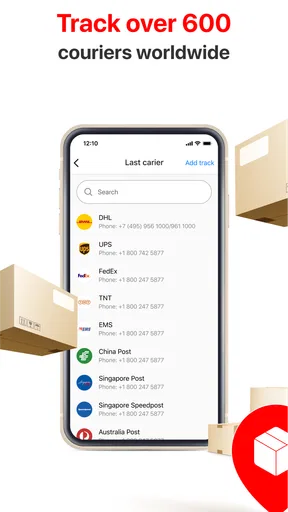
The app supports a wide range of carriers, so whether your package is coming via DHL, FedEx, or the good ol’ postal service, Spottrack has got you covered. You can add tracking numbers manually or scan the barcode, which is a nifty feature if you’re not in the mood for typing.
Features that Make Spottrack Shine
One of the standout features is the real-time notifications. The app keeps you updated with every move your package makes. If you’re like me and tend to forget about impending deliveries, these alerts are a game-changer. You’ll get a ping when your package is out for delivery and another when it’s safely at your door.
Another cool feature is the map view. Spottrack doesn’t just tell you where your package is; it shows you. You can see the delivery route and get a better estimate of when your package will arrive. It’s like tracking Santa on Christmas Eve, but for grown-ups.
Using Spottrack: A Day in the Life
The first time I used Spottrack, I was skeptical. I mean, how much better could it be than the tracking pages we’re all used to? Turns out, a lot better. I ordered a new gadget online and plugged the tracking number into Spottrack. Instead of having to check back constantly, I went about my day. Every update came right to my phone, and I knew exactly when my package was at the local facility and when it was out for delivery.
By the end of the day, I felt like a delivery expert. I knew more about my package’s journey than I ever wanted to, but in a good way. And when the doorbell rang, I wasn’t startled—I was ready.
Wrapping Up the Experience
In a world where online shopping is the norm, having a reliable package tracker is essential. Spottrack delivers on its promises, making the wait for packages less of a guessing game and more of a precise science. If you haven’t tried it yet, I’d say it’s definitely worth a download.
All in all, whether you’re a frequent online shopper or just someone who wants to stay on top of their deliveries, Spottrack has the tools to make your life easier. Give it a try and see your package tracking woes melt away.
Pros
- Supports multiple carriers worldwide.
- Real-time tracking updates.
- User-friendly interface.
- Customizable notifications.
- Secure data handling.
Cons
- Limited free features.
- Occasional syncing delays.
- Ads in the free version.
- No offline mode available.
- Requires account creation.
FAQs for Spottrack: Package Tracker
What is Spottrack: Package Tracker, and how does it work?
Spottrack: Package Tracker is an app designed to help users track their packages from various carriers in one place. By entering the tracking number, the app consolidates updates from multiple shipping services, providing real-time status and notifications. This eliminates the need to visit multiple carrier websites for tracking.
Is Spottrack: Package Tracker compatible with all shipping carriers?
Spottrack supports a wide range of international and local carriers, including USPS, FedEx, UPS, DHL, and more. While it covers a majority of popular carriers, it's always best to check the app's carrier list to ensure your specific service is supported before using it for tracking.
Does Spottrack: Package Tracker offer any premium features?
Yes, Spottrack offers premium features for users who require more advanced tracking capabilities. Premium users can benefit from features like ad-free experience, unlimited tracking numbers, and enhanced notifications. These features ensure a more streamlined and efficient package tracking process for frequent users.
Can I receive notifications for my package updates with Spottrack?
Spottrack provides real-time notifications for updates on your package status. Users can customize notification settings, choosing to receive alerts for key events such as shipping, transit updates, and delivery. This ensures you stay informed about your package's progress without constantly checking the app.
Is my data secure with Spottrack: Package Tracker?
Spottrack prioritizes user privacy and data security. The app uses encryption to protect tracking information and personal data. Additionally, it complies with data protection regulations to ensure that your information is safe. Users can also manage their data settings within the app to enhance privacy.


